
Prediction Stack
read-only market data, your brand.
Everything you need to preview, configure, brand and deploy your own read-only prediction-market data and analytics site over Kalshi and Polymarket public data. Read it top to bottom the first time. After that, press / and search.
01What you bought
Prediction Stack is source code for a set of static web pages over two prediction-market venues, Kalshi and Polymarket, plus a data job that runs on GitHub Actions and an operator admin that runs on your own computer.
| Part | What it does today | Folder |
|---|---|---|
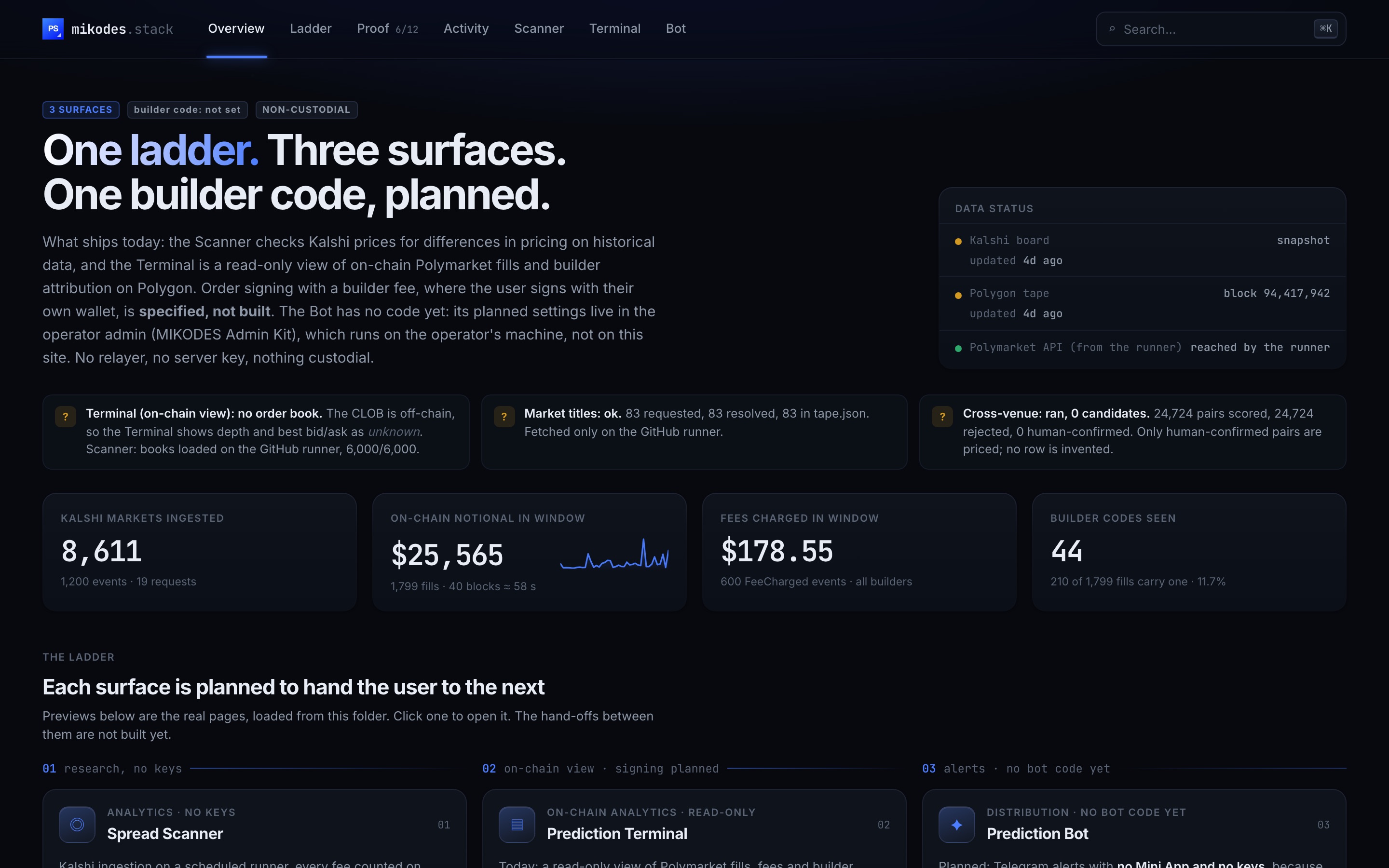
| Landing page | Links the surfaces, shows the data status and the latest numbers from the data files. | index.html |
| Spread Scanner ("Spread Research") | Kalshi spreads with every fee counted and annualised over the days the money is locked, the cross-venue matcher's result, venue health and the pair review queue. | scanner/public/ |
| Prediction Terminal ("Builder Intelligence") | Polymarket fills, fees and builder-code attribution decoded from the Polygon blockchain. Read-only: no wallet, no key, no orders. | terminal/public/ |
| Alert bot | Settings only (in the admin). No bot runtime ships; the public page says where the settings live. | bot/public/ |
| Refresh job | Fetches Kalshi, Polymarket and Polygon on a GitHub runner, writes the JSON files the pages read and commits them. | .github/workflows/refresh.yml |
| Operator admin | MIKODES Admin Kit 0.3.0 on 127.0.0.1:8811. Writes config/public.json; pair review. | admin/ |
02Read this first: what this release does and does not do
Prediction Stack is a read-only data and analytics tool. The Terminal reads the chain; it has no wallet, no key and no order screen. The order flow that would attach your builder code to user orders is designed, not built, and no signed Polymarket order has ever been placed from this code. No Telegram bot runtime ships. Builder income cannot be read from the chain, so the admin's Revenue page shows no source and estimates nothing.
| Does | Does not |
|---|---|
|
|
From the data files committed in the package (runner run of 2026-09-25 10:27 UTC):
| Item | Result |
|---|---|
| Kalshi markets read | 8,611 (1,200 events) |
| Polymarket open markets read | 49,939 (the 50,000 safety ceiling was reached) |
| Single-venue Kalshi binary markets checked | 4,669 · 0 positive spreads after fees |
| Cross-venue Kalshi–Polymarket pairs scored | 24,724 · 0 cross-venue matches: 0 candidates, all rejected (the settlement-time veto fired on every pair) |
| Pairs confirmed by a person | 0 of 768 in scanner/data/pairs.jsonl |
| Polygon window | 40 blocks ≈ 58 s · 1,799 fills · 44 builder codes seen · 210 fills carry one |
| Polymarket fees | Shown as unknown: no live fee schedule is fetched |
These are market data from one snapshot, not results. Your own runs will show different numbers.
03How the pieces fit together
GitHub runner (refresh.yml, manual or on a schedule)
  ├─ scanner/src/run.js     Kalshi + Polymarket → public/board.json, public/crossvenue-diag.json, data/pairs.jsonl
  ├─ terminal/src/onchain.js  Polygon logs      → public/data/tape.json
  └─ terminal/src/titles.js   Polymarket Gamma  → market titles in tape.json
        │  git commit + push
        ▼
Your static host  ← also serves config/public.json
        │  plain HTTPS GET, no server code
        ▼
Visitor's browser: landing page, Scanner, Terminal

Your computer: admin/ (127.0.0.1:8811) → writes config/public.json and pair decisions → you commit and deploy
There is no application server in the visitor's path, no database behind the public pages and no API key in the code. Kalshi refuses any request that carries a browser Origin header, which is why the data is fetched by the job, not by the page.
04Pick your path
05What is in the package
The download unzips to prediction-v1.0.0/ with three folders: source/ (the code; these docs call it the repository root), documentation/ (this guide) and licenses/ (third-party licences). Inside source/:
| Folder or file | What it is |
|---|---|
index.html, favicon.png, apple-touch-icon.png, brand/ | Landing page and icons. |
scanner/ | Scanner page (public/), data job (src/), pair database and caches (data/), tests. |
terminal/ | Terminal page (public/), Polygon and titles jobs (src/). |
bot/public/ | Bot page that points to the admin settings. |
admin/ | Operator admin (Node.js + TypeScript) with the vendored MIKODES Admin Kit in admin/vendor/mikodes-admin/. |
config/public.json | The public settings file the pages read. Written by the admin. |
design-system/ | Stylesheet sources and build.sh. |
.github/workflows/refresh.yml | The refresh job. |
vercel.json, .vercelignore | Static hosting config for Vercel. |
README.md, admin/README.md, config/README.md, scanner/README.md | Short developer notes that travel with the code. |
docs/ | The repository's own developer documentation (node docs/build.mjs rebuilds it). |
06Try it before you install
The live app runs on committed data from the refresh job: prediction-demo.mikodes.com. It is read-only: no wallet, no orders. The admin is not part of the live app, because it runs only on the operator's own computer.
07How to read these docs
- Dark boxes are commands. Press Copy and paste them into a terminal. Grey text after
#is an explanation and is not copied. - Tested marks commands run on a clean copy of release 1.0.0 on 2026-09-29 while writing these docs (macOS, Node 22.22.2, npm 10.9.7). Not tested here marks standard steps that could not be run (for example a real deployment or a GitHub Actions run).
- Nothing here is financial, legal or tax advice. You are the operator and decide where and how the product is offered; read Legal and jurisdiction before you launch.